Retail Media Measurement
Part of Retail media reporting across networks
Building a cross-retailer campaign report
Create a traceable cross-retailer campaign report from bookings, original exports, metric definitions and a decision log.
Build a cross-retailer campaign report from a campaign register, original retailer exports and a definition sheet. Show delivery and cost separately from attributed outcomes, then record the decision each view supports. A reader should be able to trace every figure without forcing unlike results into one score.
Cross-retailer report build sequence
- Set the report grainFix the row (retailer, campaign, reporting period) that source data rolls up to
- Create the campaign registerStable internal ID plus retailer campaign IDs, products, dates, market, format, objective, approved cost
- Import original exports with definitionsKeep extraction date, latest purchase date included and original field names beside mapped fields
- Reconcile against the registerMatch campaign IDs and dates before any totals are calculated
- Total only compatible, additive measuresSpend after currency, tax and charge scope; impressions as delivered events, not deduplicated reach
- Publish decisions and archiveReport version, exports, register and definition sheet archived together
Set the report grain
Keep source data at the most detailed grain each retailer supplies. For a shared comparison view, use a row such as retailer, campaign and reporting period; add placement or product only where the relevant reports support that split. Keep any network total separate, and do not copy it into product or placement rows.
Create a campaign register before importing results. Give each booking a stable internal ID and record the retailer's campaign IDs, advertised products, planned dates, market, format, objective and approved cost. Log renamed campaigns, new line items and date changes so a refreshed export does not look like new activity.
Bring in source data and definitions
Save each original report with its extraction date, the latest purchase date included and a method note. In a working table, retain original field names and units beside mapped fields. Record the spend's tax and charge scope, the reporting time zone and whether sales are gross or net. Keep served and viewable online impressions distinct; label in-store plays and store coverage separately.
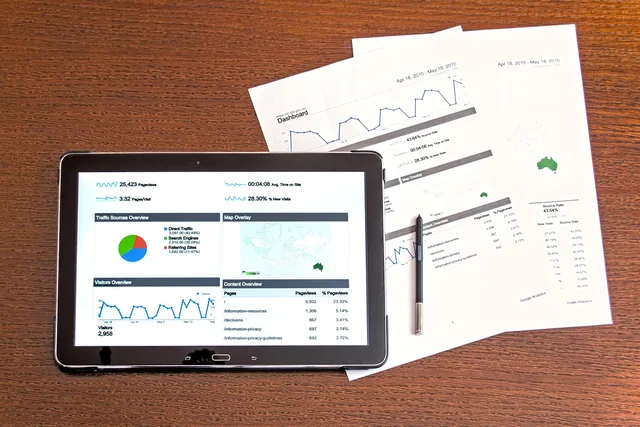
Four panels can carry a compact report:
- Booking and delivery:planned versus delivered placement, dates, eligible locations and the format's delivery unit.
- Cost:booked, spent, invoiced and still committed amounts, including charges outside platform spend.
- Attributed outcomes:orders, units and value, with product scope, interaction rule, window, sales basis and transaction coverage.
- Decision log:observation, limitation, next action, owner and due date.
A spreadsheet can hold these panels. Link each displayed figure to its source and definition.
Four panels a compact cross-retailer report needs
- Booking and deliveryPlanned versus delivered placement, dates, eligible locations, format delivery unit
- CostBooked, spent, invoiced and still committed amounts, including charges outside platform spend
- Attributed outcomesOrders, units and value with product scope, interaction rule, window, sales basis, transaction coverage
- Decision logObservation, limitation, next action, owner, due date
Reconcile before calculating totals
Match campaign IDs and dates to the register. Investigate duplicate rows, overlapping refreshes, missing days, unit or currency changes, and sales data ending earlier than delivery data. Confirm whether a new file replaces earlier results or adds another period. Mark unresolved gaps rather than adjusting figures to match a forecast.
Total only compatible, additive measures. Spend can be added after currency, tax and included charges are reconciled. Compatible impression counts can be added as delivered events, but the sum is not deduplicated reach.
Separate attributed-sales totals may credit overlapping purchases. Do not present their sum as unique sales without a documented deduplication method. Calculate a combined ROAS only if both its sales and cost bases align.
Reconciliation checks before totalling
- Duplicate rows in a refreshed export
- Overlapping refresh periods
- Missing delivery days
- Unit or currency changes mid-flight
- Sales data ending earlier than delivery data
- Whether a new file replaces earlier results or adds a period
- Campaign IDs and dates matched to the register
- Unresolved gaps marked, not adjusted to match a forecast
Make the final page usable
Put each campaign's objective beside the few measures that address it. Label a comparison comparable, qualified or unavailable, and give the reason. Show whether a sales value includes wider brand products, whether recent results may change, and which costs sit outside the retailer's platform report.
Close with decisions supported by the evidence. A delivery gap calls for a booking and invoice check. A missing product split calls for a report request before changing SKU-level spend.
An additional-sales claim requires a credible comparison; attributed-sales columns cannot supply it. Archive the report version, exports, register and definition sheet together.
Comparison labels and the reason behind them
- ComparableMeasures and bases align across the retailers being placed side by side
- QualifiedShown with the caveat stated: wider brand products included, results still settling, costs outside the platform report
- UnavailableNo defensible basis to compare; the reason is given instead of a number
- Not an additional-sales claimA credible comparison is required; attributed-sales columns cannot supply it